What are two basic components of Computer System? I think you all know this, i.e. Hardware and Software. Hardware includes Processor, RAM, Storage, Keyboard, Mouse etc. Software includes Windows, iOS, Ubuntu, Photoshop, Word, Excel, etc. We need one physical hardware to install any Operating System on it. These are few basics of Computer System everyone knows.
But, have you ever thought, what if you need four different operating systems? One way is to buy four different hardwares and install four different Operating Systems.

Do you think it is economically best way? Imagine, what if something wrong happens to hardware? Your data will also lost. Other than this, how will you manage four hardwares? It will be expensive and complicated. Quality of servers will be compromised and networking will be complicated. So, the answer is NO. Because, Operating System get connected to one hardware and you won’t be able to move Operating system from one hardware to another.
Now, you will be thinking, what is the other way of using different Operating Systems at a time. Imagine, what if there is only one hardware and that one hardware is able to manage different Operating system?

For this to happen, we need a Layer in between Hardware and Operating Systems that will manage different Operating Systems over a single hardware.
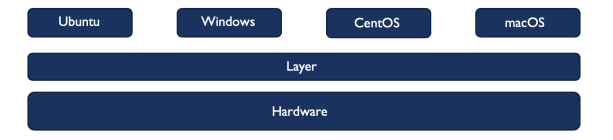
This concept of managing Different Softwares over a single hardware is called Virtualisation. This layer that manages is called as Hypervisor. So, now how can we define Virtualisation? Virtualisation is
- Changing the mindset from physical to logical
- Creating more logical IT resources, called virtual systems, within one physical system.
- Separating Operating System from underlying Hardware.
In traditional architecture, one Operating System is managed over one Hardware and then different applications can run over one Operating System. But, in Virtual Architecture, Virtualisation Layer run over one hardware and different Operating Systems can run over Virtualisation layer. Then, different application can run over different operating systems.
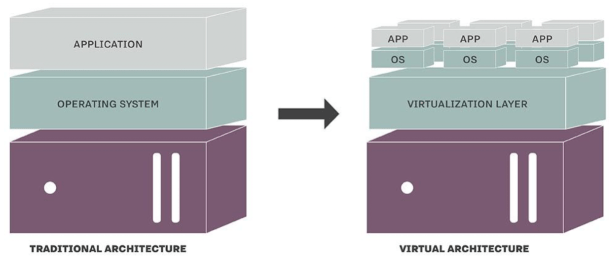
Few examples of examples of virtualisation are:
- Desktop Virtualisation: Different Operating Systems over one hardware
- Network Virtualisation: Dividing one physical networks into several virtual networks, like virtual router.
- Storage Virtualisation: Diving one storage into several small disks
- Application Virtualisation: Separating computer application from Operating System layer.
Virtualisation is new concept and it is used by many ways like personal, technical and commercial. For personal use, parallel operating Systems can run over one hardware. For technical use, QEMU is used in course work and for research. For Commercial use, several softwares like, XenServer, VMware are used as hypervisors for virtualisation.
Now, you might be wondering what hypervisor is? Hypervisor is a software that virtualises the hardware resources. Hypervisor separates a computer’s operating system and applications from the underlying physical hardware. There are two types of hypervisors:
Type-1 Hypervisor: This type of Hypervisor runs directly on the host machine’s physical hardware, also called as bare-metal hypervisors. In this type, Guest OS is unaware of shared physical hardware and guest OS has direct access to hardware resources. Guest Operating system considers itself as a separate complete computer. This type of hypervisors are also called as Narrative hypervisors. XenServer, VSphere, VMware are commonly used Type-1 Hypervisors.

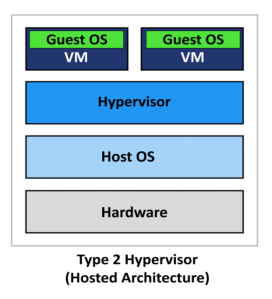
Type-2 Hypervisors: This type of Hypervisor is typically installed on top of an existing Operating System. It is also called as Hosted Hypervisor because it relies on the host machine’s existing Operating System to manage calls to CPU, memory, Storage and network resources. Virtual Box, VMware are commonly used Type-2 Hypervisors.
Types of Virtualisation
Another important concept that comes under discussion while discussing virtualisation is types of virtualisation. I hope you have now clear understanding of virtualisation and hypervisors. Now, let’s start something more complex about virtualisation.
Para-virtualisation
In para-virtualisation, guest Operating System is aware of shared physical resources and that it is being virtualised. Guest Operating System co-operate with the Hypervisor to enable increased memory and device performance. Every query from Operating System is sent to Hypervisor and Hypervisor forwards that query to physical hardware. Guest Operating system co-operates with the Hypervisor so that host memory can be efficiently distributed. This type of virtualisation is mostly used in large data centres for large-scale virtualisation.

Full Virtualisation
In full virtualisation, guest Operating System is not aware of shared physical resources and that it is being virtualised. Guest operating system considers itself as a separate complete system. Every query from Operating System is directly sent to physical hardware because Operating System is directly in contact with Hardware. This type of virtualisation is mostly used in large data centres where high performance is required.

Hosted Virtualisation
In hosted virtualisation, an Operating System is installed over physical hardware. Hypervisor is installed over that Operating System. We can say that, Operating System controls Hypervisor. Further, Guest Operating Systems are managed by hypervisor. In this, every query from guest Operating System is sent to Hypervisor. Hypervisor further forwards the query to Host Operating System. Host Operating System then manages all the queries and reply back to hypervisor. In this, Guest Operating System are fully aware of shared physical resources and that they are being virtualised. This type of virtualisation is used for personal testing use cases. For example, installing Virtual Box in any Host Operating System.

Summary
The image below, perfectly explains all the types of virtualisation and difference between them.

I hope this will be helpful for a lot of people who still have any confusion! Please Comment, if you find and confusion or need any help.
Good Luck!
Thanks!
 Zainub Wahid
One thought on “Introduction to Virtualisation”