Cloud and Automation are real buzzwords these days. The concept of “the cloud” is evolving day-by-day. The open-source community is working hard for evolving the cloud concept, helping cloud users and to provide every facility required by users. Openstack is an open-source software platform for cloud management.
Heat is an OpenStack component that provides a template to create different OpenStack resources like Instance, Router, Network, etc. Heat primarily manages infrastructure, but the templates integrate well with software configuration management tools.
Heat provides a template-based orchestration for describing a cloud application by executing appropriate OpenStack API calls to generate running cloud applications. Overview of heat architecture is:

A Heat template describes the infrastructure for a cloud application in text files which are readable and writable by humans and can be managed by version control tools. Templates specify the relationships between resources (e.g. this volume is connected to this server). This enables Heat to call out to the OpenStack APIs to create all of your infrastructures in the correct order to completely launch your application.
The software integrates other components of OpenStack. The templates allow the creation of most OpenStack resource types (such as instances, floating IPs, volumes, security groups, users, etc), as well as some more advanced functionality such as for instance high availability, instance autoscaling, and nested stacks.
So, now let’s start learning about the heat template and how you can write your own template. In this article, I will write a simple template for creating an instance and installing any software/tool in that instance.
Template Structure
Heat Template is basically a YAML file and there are seven basic components of the heat template. Let me define them first using the basic heat template structure:
heat_template_version: <Version Date>
description:
# description of the template
parameter_groups:
# a declaration of input parameter groups and order
parameters:
# declaration of input parameters
resources:
# declaration of template resources
outputs:
# declaration of output parameters
conditions:
# declaration of conditions
heat_template_version
heat_template_version is the first value to be mentioned in the YAML file. This key with value 2013-05-23 (or a later date) indicates that the YAML document is a HOT template of the specified version. The version depends on the Openstack release. This value also tells about the features and tags validated and supported by the heat. The version is usually mentioned in the form of the release date of the OpenStack version. But the code name of heat release is also supported as the heat_template_version value. In the sample file given below, “heat_template_version: 2014-10-16” is the heat template version. This value tells about the heat version and features validated and supported by the template. Following are few heat templates versions:
-
- 2013-05-23
- 2014-10-16
- 2015-04-30
- 2015-10-15
- 2016-04-08
- 2016-10-14 | newton
- 2017-02-24 | ocata
- 2017-09-01 | pike
- 2018-03-02 | queens
- 2018-08-31 | rocky
description
This optional key gives a description of the template, or the workload that can be deployed using the template. This value is for user understanding only. This explains the purpose of the template and function HOT template is going to perform.
parameter_groups
This section is used for grouping the input parameters. This grouping helps in explaining how and in which order parameters will be taken as inputs. This section is optional and can be omitted when necessary. But if you are using this section, then make sure every parameter is listed in this section. The parameters not listed in parameter groups will be omitted and could not be taken as input. The structure of this section is as follows:
parameter_groups:
– label: <human-readable label of parameter group>
description: <description of the parameter group>
parameters:
– <param name>
– <param name>
In the sample file, given below, you can see the parameter_group section, how parameters are grouped and how inputs will be taken.
label:
A human-readable label that defines the associated parameters in the group. For example, in the sample file, given below, the label “Network” defines the group takes inputs related to networking. parameters related to network are grouped under this label. Similarly for image and post_installation.
description:
This attribute allows for giving a human-readable description of the parameter group. You can see the example in the sample file.
parameters:
This consists of list of parameters to be grouped under the specified label. For example, in the sample file, private_net, public_net, and dns_ip are listed under label “Network”.
parameter_name:
This is the name taken from the parameter section to be listed under the label. For example, public_net is the parameter name listed under label “Network”.
parameters
This section is used for taking inputs from the user. In this section, input parameters are specified which have to be provided when instantiating the template. The section is optional and can be omitted when no input is required. Each parameter is specified in a separated nested block with the name of the parameters defined in the first line and additional attributes such as type or default value defined as nested elements. The structure of this section is like:
parameters:
<param name>:
type: <string | number | json | comma_delimited_list | boolean>
label: <human-readable name of the parameter>
description: <description of the parameter>
default: <default value for parameter>
hidden: <true | false>
constraints:
<parameter constraints>
immutable: <true | false>
tags: <list of parameter categories>
param name:
This is the name of the parameter. This name will be used in the YAML file for calling that parameter. For example, in the parameter_group section, the param name is mentioned in the list under a label. In the sample file, you can see param names like private_net_id, public_net_id.
type:
This value tells about the type of input, user has to mention. For example, if type is “number”, user is supposed to enter a number as input. In the sample file, the type of parameter “private_net_id” is string. This means user is required to enter a string as an input.
label:
This is a user-readable value for parameter. This will be visible to the user as a label of input. For example, in the sample file, the label for parameter “private_net_id” is “Private Network”. From his label, user will be able to understand what input is required. This attribute is optional. If label is not mentioned, “param name” will be used as label.
description:
A human-readable description for the parameter. This attribute is optional.
default:
This value gives the default value for a parameter. If the user enters the input, then heta will use that value for a parameter. But if the user didn’t mention the input, then default value will be used by heat. For example, in the sample file, for “image” parameter, default value “centos” is set. This means, heat will take “centos” image for launching a VM.
hidden:
This defines whether the parameters should be hidden when a user requests information about a stack created from the template. This attribute can be used to hide passwords specified as parameters. This attribute is optional and defaults to false.
immutable:
Defines whether the parameter is updatable. Stack update fails if this is set to true and the parameter value is changed. This attribute is optional and defaults to false.
tags:
A list of strings to specify the category of a parameter. This value is used to categorize a parameter so that users can group the parameters. This attribute is optional.
constraints:
A list of constraints to apply. The constraints are validated by the Orchestration engine when a user deploys a stack. The stack creation fails if the parameter value doesn’t comply with the constraints. This attribute is optional. The constraints block of a parameter definition defines additional validation constraints that apply to the value of the parameter. The parameter values provided by a user are validated against the constraints at instantiation time. The constraints are defined as a list with the following syntax:
constraints:
– <constraint type>: <constraint definition>
description: <constraint description>
constraint type:
It tells the type of constraint to be applied. For example, length, allowed patterns, range, allowed values, custom constraints, etc.
The custom_constraint constraint adds an extra step of validation, generally to check that the specified resource exists in the backend. Custom constraints get implemented by plug-ins and can provide any kind of advanced constraint validation logic.
constraint definition:
This is the actual definition of constraint depending on the constraint type. For example, if constraint type is “length” then its definition will be like “{ min: 6, max: 8 }”.
In the sample file, type “custom_constraint” is used. This gives the user a list of possible values. This is the list of existing parameter values. For example, in private_net_id, the list of existing networks in OpenStack will be available for the user. Users will be able to select from that list. You can check the list of plugins from here.
Pseudo parameters:
In addition to parameters defined by a template author, Heat also creates three parameters for every stack that allow referential access to the stack’s name, stack’s identifier and project’s identifier. These parameters are named OS::stack_name for the stack name, OS::stack_id for the stack identifier and OS::project_id for the project identifier.
Resources
This section contains information about the resource that has to created or initiated through this template. This section with at least one resource should be defined in any HOT template, or the template would not really do anything when being instantiated. Each resource is defined as a separate block in the resources section with the following syntax:
resources:
<resource ID>:
type: <resource type>
properties:
<property name>: <property value>
metadata:
<resource specific metadata>
depends_on: <resource ID or list of ID>
update_policy: <update policy>
deletion_policy: <deletion policy>
external_id: <external resource ID>
condition: <condition name or expression or boolean>
resource id:
A resource id is a unique id for the representation of a resource. For example, in the sample file, “server” is the resource id for VM.
type:
This attribute defines the type of resource to be launched. For example, in the sample file, for “port” the type mentioned is “OS::Neutron::Port”. These are the pre-defined values for resources. These values can be checked from the Orchestration Section of OpenStack Horizon. These values are also dependant on heat_template_version. For example, for VM launching, the type mentioned is “OS::Nova::Server”. this value helps heat to communicate to the specific component of OpenStack for launching resource.
properties:
A list of resource-specific properties. The property value can be provided in place, or via an intrinsic function. This section is optional. For example, in the sample file, properties for “server” are name, image, flavor, keypair, etc.
metadata:
Resource-specific metadata. This section is optional.
depends_on:
This attribute is required, when the creation of resources is dependant on any other resource. For example, in the sample file, the creation of VM is dependant on “Port” and “Floating IP”.
update_policy:
Update policy for the resource, in the form of a nested dictionary. Whether update policies are supported and what the exact semantics depends on the type of the current resource. This attribute is optional.
deletion_policy:
Deletion policy for the resource. The allowed deletion policies are Delete, Retain, and Snapshot. Beginning with heat_template_version 2016-10-14, the lowercase equivalents delete, retain, and a snapshot is also allowed. This attribute is optional; the default policy is to delete the physical resource when deleting a resource from the stack.
condition:
This attribute is where the condition of resource is defined. This tells whether the resource is to be created or not.
outputs
This section allows for specifying output parameters available to users once the template has been instantiated. This section is optional and can be omitted when no output values are required. Each output parameter is defined as a separate block within the outputs section according to the following syntax:
outputs:
<parameter name>:
description: <description>
value: <parameter value>
condition: <condition name or expression or boolean>
parameter name:
The output parameter name, which must be unique within the outputs section of a template. For example, in the sample file, “public_ip” is the parameter name for the outputs section.
parameter value:
This is the value that will available to the user as an output value. This value is usually resolved by means of an intrinsic function. This is the required attribute. For example, in the sample file, “value: { get_attr: [ floating_ip, floating_ip_address ] }”. This gets the value from the resource section and saves it as an output value.
condition:
To conditionally define an output value. None value will be shown if the condition is False. This attribute is optional.
conditions
This section contains the statements that can be used to restrict an input, resource creation or defining a property. They can be associated with resources and resource properties in the resources section, also can be associated with outputs in the outputs sections of a template. This section is optional and can be omitted when no condition is required. The conditions section is defined with the following syntax:
conditions:
<condition name1>: {expression1}
<condition name2>: {expression2}
condition name:
The condition name, which must be unique within the conditions section of a template.
expression:
The expression is expected to return True or False. Usually, the condition functions can be used as expression to define conditions:
-
- equals
- get_param
- not
- and
- or
- yaql
For example:
conditions:
cd1: True
cd2:
get_param: param1
cd3:
equals:
– get_param: param2
– yes
cd4:
not:
equals:
– get_param: param3
– yes
These are a few examples of using condition expression statements. You can modify them as per your requirements.
Intrinsic Functions
HOT provides a set of intrinsic functions that can be used inside templates to perform specific tasks, such as getting the value of a resource attribute at runtime. These functions can only be used within the “properties” section of each resource or in the outputs section. Few intrinsic function examples are: get_attr, get_resource, get_param, get_file, repeat, etc. You can see the example in the sample file.
Sample YAML File
The following sample file gets inputs from users and launches a VM using defined attributes. After the successful launching of a VM, this template installs a tool, defined/ given by the user.

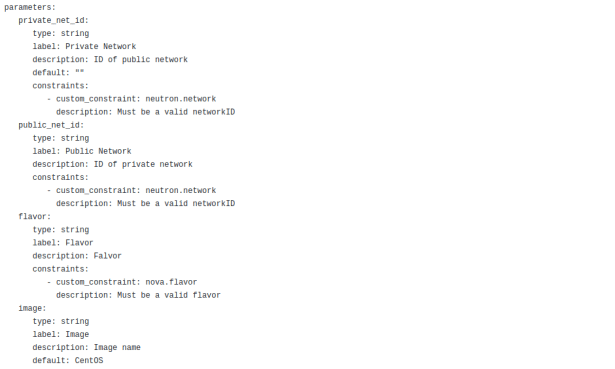


You can also view the raw file from this repository: VM_Template.
This article is just the introduction of writing your own heta template for OpenStack. I hope this will be helpful for a lot of people who still have confusion! Please comment, if you know something else which I missed or stated incorrectly.
Thanks!
source: https://wiki.openstack.org/wiki/Heat/Vision
https://docs.openstack.org/heat/rocky/template_guide/hot_spec.html#conditions-section
 Zainub Wahid