Have you ever thought about starting your own E-Commerce business? If yes, you might have looked for possible options of hosting a platform for online business. One option that came to mind of every person starting his/her online business is to buy a server and manage online platform by themselves. But, have you ever thought of money you will spend while going through this option? This option requires a lot of money and maintenance. For example purchasing a server, cooling system, space, networking, scaling etc.
Have you ever thought of solving this issue? How easy will it be if you can just buy space online and you don’t have to worry about rest of problems like, space, networking, security, expansion. This concept of availability of specifications over the internet around the clock is known as cloud computing. Isn’t it interesting? Now, let’s move forward and check the technicalities of cloud computing.
What is Cloud Computing?
Cloud computing is the on-demand availability of system resources over the internet without the knowledge of underlying computer system and networking. For example, if your want a virtual machine of 4 GB RAM and 100 GB SSD you just have to select the specifications and your virtual machine will be ready within few seconds. Let’s suppose, after few months, now you want to another 100 GB SSD in your machine, you can do it with one click and within few seconds another 100 GB space will be added to your machine. Isn’t it cool? Instead of buying high-class servers and managing them by your own, you can just buy virtual machine with same specifications online and expand it whenever you want.
Google Drive is a very good example for new bees for understanding Cloud computing. In google drive, by default, you have space of 15 GB. But, you can expand it to your required space if needed. For this, you just have to pay and space will be allocated to your Gmail account. You don’t have to buy your own SSD, you can just purchase space online. Not only this, you can release the space if you do not need it anymore. So, here comes next interesting question, how this all work?
How does Cloud Computing Work?
Instead of buying your own computer infrastructure, you can rent the required specifications online from cloud service providers. Cloud Service Providers are peeps or companies who purchase all the computer Infrastructure and then rent out parts of that over the internet around the globe to the users. For example, Amazon. You all might have heard about Amazon. Amazon is the biggest Cloud Service Provider. In Amazon’s data center, they have all the infrastructure maintained. A user can buy any required specification from Amazon for any period of time and then release the infrastructure back to Amazon when not required. Amazon bills depends upon the usage of infrastructure used by user.
It is not limited to Amazon only. There are so many Cloud Service Providers working on this same technique. You have to create an account and provide your card details. Then, you have to select the specifications required and cloud provider will assign that selected specifications to your account. You will be billed depending upon your usage. You can access the computer infrastructure from your home using your computer and internet.
Now, what do you think, how Cloud Service Providers assign those specifications? Do they buy whole server for just one user? Do they buy single external Drive (SSD/HDD) for one user only? Is it good and reasonable? If not then what is the reasonable technique Cloud Service Providers use?
Here comes virtualization. Company buys a server and use virtualization to assign a single server to different users depending upon their needs. If you have not enough knowledge of virtualization, I will ask you to visit my previous post on Virtualization. Furthermore, there are so many software developed to provide Cloud Service. For example, OpenStack.
Why is it called Cloud Computing?
You might have understand the basics of Cloud Computing from above description that availability of on-demand computer infrastructure over the internet around the globe is called cloud computing. Do you know, why is it called Cloud Computing? Any random guesses?
Let me explain to you, the reason behind calling it Cloud Computing. As above description tells, it is available over the internet without any direct contact of user with hardware, user have no knowledge what type of hardware is used, how networking is done, which storage is used, where the hardware is located. User is only concerned with his requirements and all other details are irrelevant to user. Therefore, it is called as Cloud Computing because, it is accessible over the internet and user doesn’t have minor details about the hardware. It is just a cloud of stuff.
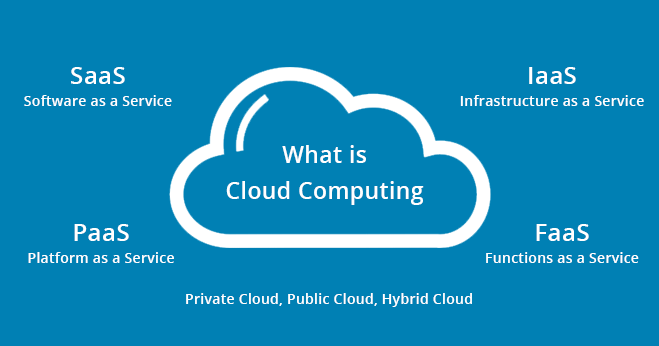
Service Models of Cloud Computing Services
Generic Models
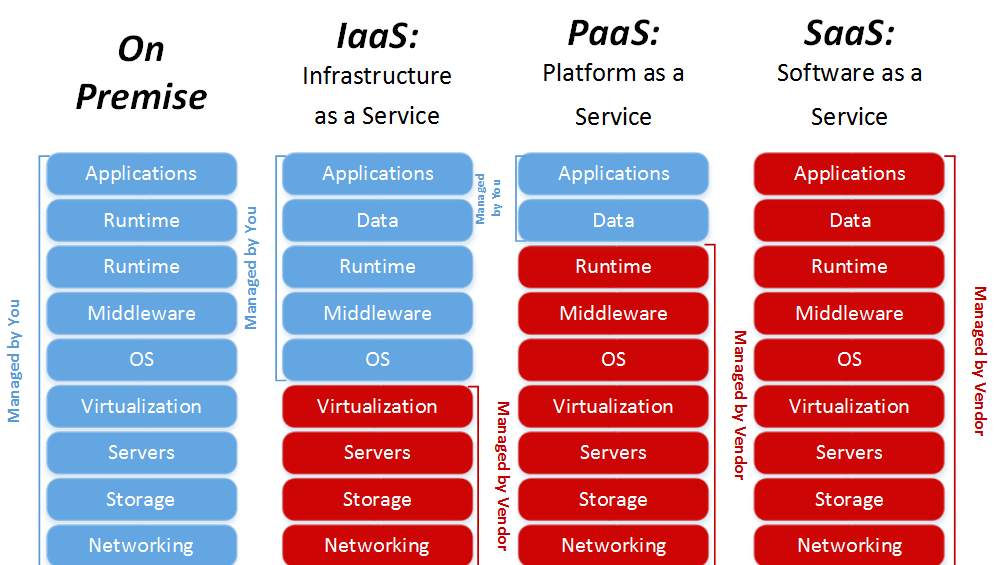
Cloud Computing has bee divided into three generic categories depending on services. These are explained below:
Software-as-a-Service
Software-as-a-Service abbreviated as SaaS. With respect to Cloud Service Provider, this Service is known as providing Software required by user. Due to this model, software becomes available to all user across the globe over the internet. A user can access these software through application store or web browser. This is the mostly used Cloud Service which users use on daily basis. Some software provided by providers are free of cost and some have charges. This model is useful for customers who just want to use application. For example, Google Docs, Google Drive, Firefox, Google Mail, WordPress.
Platform-as-a-Service
Platform-as-a-Service abbreviated as PaaS. With respect to Cloud Service Provider, this service is known as providing platform required by user. For example, a user enters a command to instantiate a ubuntu virtual machine and tell about the required specifications like RAM, SSD etc. A user don’t have to worry about OS deployment, hardware implementation, networking, security, backup. All of these will be handled by Service Providers. A VM with all required specifications will be instantiated and handed over to user. Now, user can install any application he wants. This model is usually useful for Developers.
Infrastructure-as-a-Service
Infrastructure-as-a-Service abbreviated as IaaS. This service means providing fundamental infrastructure like compute, storage, network resources to user on-demand. Cloud Provider provides hardware to user as required and user can deploy any OS he needs and manage. Furthermore, user can scale and shrink resources according his requirements. Providers’ responsibility is security, backup and any hardware problem. For example, Digital Ocean, Amazon, Azure, Google Cloud etc.
Other Models
There are other types of Cloud Computing Services. Some of them are as:
Database-as-a-Service
Database-as-a-Service abbreviated as DBaaS. This means, providing managed required Database to a user. In this service, user have no knowledge of implementation of database. Furthermore, a user can manage, operate and scale the database as required. For example, a developer needs MySQL database Service, he will send a command to instantiate a MySQL Database instance and database instance will be set for user. User is just responsible for operating and scaling the database instance. Implementation, Backup, Security are not user’s responsibility. Cloud Service Provider is responsible for implementation, Backup, Security etc. Examples of DBaaS are MySQL database instance, MongoDB instance, Oracle instance etc.
Container-as-a-Service
Container-as-a-Service abbreviated as CaaS. This means, providing required deployed Container to a user. A user just have to login to container and do all the work. This allows user to upload, scale, organize, start, stop and manage the containers. Security and backup are responsibilities of Service Provider. Container based virtualization environment is used by Service Provider to provide CaaS. Using this, users don’t have to buy whole infrastructure. They only have to pay for Container and implementation of Container is managed by Service Provider.
Function-as-a-Service
Function-as-a-Service abbreviated as FaaS. This means, a snippet of code available online and user/developer can use it whenever required. It helps developers to modify and use the code as required. For example Mouse Clicking Code, Text Box code etc.
Deployment Models of Cloud Computing
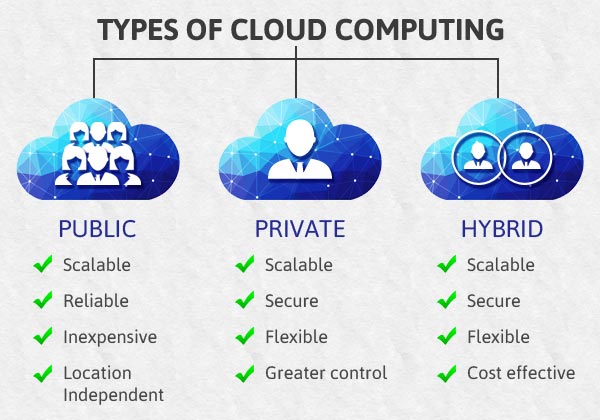
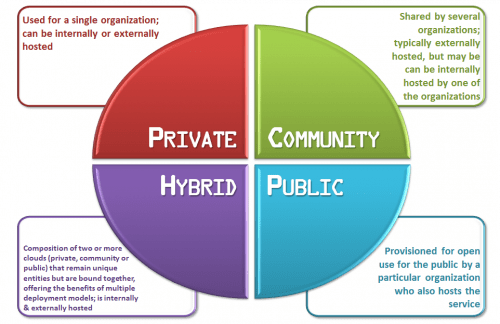
There are four basic models on which Cloud is deployed. These are as follows:
Public Cloud
Public Clouds are those where anyone can make an account and use the facilities provided by that Cloud Service Provider. For example Amazon, Google, Azure etc.
Private Cloud
Private clouds are those which are restricted to a firm or company or person. Clouds which are not accessible to public user. They are more secured and are deployed according to the requirement of firm/company. For example cloud hosted by an IT Firm.
Hybrid Cloud
This model is a mixture of above two models. A model where some resources are for company itself only and other extra resources are available for public where they can create an account and pay for their requirements. This model shares resources as a Public and Private wherever resources are required.
Community Cloud
Now-a-days, Different companies are working together on a mega open source project called as community project. These projects are accessible to everyone. The platform providing resources for community projects are called as Community Clouds. These clouds are limited for community projects only. No one can do any personal work on those clouds.
Benefits of Cloud Computing
From above description you would have noted enough benefits of Cloud Computing. Let’s list them down:
- Do not have to buy your own infrastructure and manage it.
- Easily Scalable.
- Secure.
- Affordable.
- Online Backup.
- Maintained by Provider.
- Accessible all over the world over the internet.
- No upfront Costs. Only pay for resources used.
These are very few benefits of cloud computing. Major benefits of cloud computing vary depending on the model you are using. Above mentioned benefits are few general benefits of Cloud Computing.
I hope this will be helpful for a lot of people who still have confusion! Please comment, if you know something else which I missed or stated incorrectly.
Thanks!
 Zainub Wahid