Now-a-days Smart phone has become the most important thing everyone owns or wants to own. And when someone’s talking about smart phones, most of the time, they mean Android Smart phones. Android smart phones vary in all kinds of prices and categories. Android phones have taken the place of laptops. Android is developing day by day at such a pace that every can afford an android smart phone. Overall, Samsung is known as a market leader when it comes to Android but if I talk about Pakistan, Q-Mobile produces the cheapest smart phones and they are known as the best sellers.
As the usage of android smart phones is increasing day by day, android development is also increasing. Making different applications for android and selling them at high prices has become a new source of income. As a developer, I think every developer should be familiar with android development. There are many freelancing jobs for android developers. Every business is moving towards mobile apps, so I can say that there is much scope for android developer for next 7 to 8 years.
Softwares and Languages for Android Development:
Now leaving other things behind, let’s start on how to start android development or how to build your first android application. Before starting anything, you should be familiar with different software used for android development.
Java is the language that you need to know in order to start android development. So before starting, make sure you know the basics of Java and JDK (latest version) should be installed in your PCs. Android studio is the only software available for android development. Before android studio, eclipse was used for android development with plugins installed for android development. Android plugins are known as SDKs (Software development Kit). But later on, android community decided to remove eclipse plugins from web and made android studio the only software for android development.
Requirements for Android Studio:
Requirements for android studio:
- 7/8/10 windows.
- 2 GB RAM for android studio. 8 GB RAM is recommended for your PC.
- JDK 8
- 4 GB available disk space for android studio and SDKs.
- 64-bit operating system.
- Universal ADB Driver (explained later)
Downloading Android Studio:
Now moving forward, download the android studio. Android Studio is a free software available on its official website. You can download Android studio from the link: https://developer.android.com/studio/index.html . You don’t have to do anything else. just download the file.
Installing Android Studio:
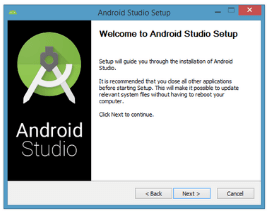
Click on the android studio application you have installed. It will start installing on your PC. It is highly recommended to read all the instructions/steps mentioned on installation windows. And then click NEXT. Do it carefully. As it is your first time, I will recommend you to leave all the settings as default.

After successfully installation of android studio, start android studio.
On running the android studio first time, it will ask about configurations settings. Keep it default and standard because it’s your first try.


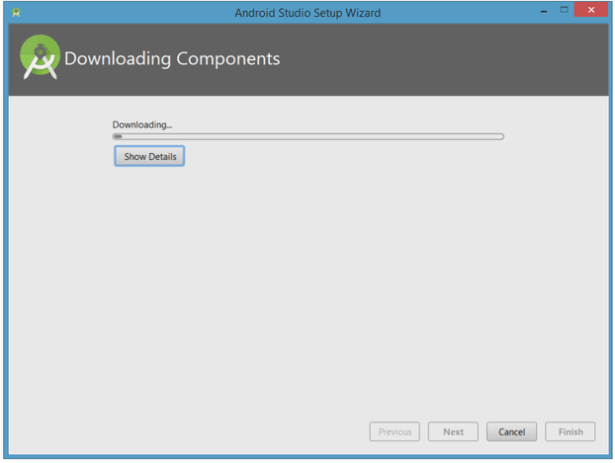
When configuration is finished, it will unzip and install some important components.
Finally, you will be able to see the window “Welcome to Android Studio”.

Up till now, we have learnt how to install android studio. I will continue it to building your first android application in next post. I hope this will be helpful for lot of people who still have confusion! Please comment if you find any confusion or need any help. And stay tunned for next post!
Thanks!
 Zainub Wahid
Thank you for some other informative web site. The place else may I get that kind of info written in such a perfect method? I’ve a venture that I am just now running on, and I’ve been on the glance out for such information.|
LikeLiked by 1 person
I really like what you guys are up too. This type of clever work and exposure! Keep up the amazing works guys I’ve incorporated you guys to my blogroll.|
LikeLiked by 1 person
Everyone loves what you guys tend to be up too. This type of clever work and reporting! Keep up the very good works guys I’ve incorporated you guys to my personal blogroll.|
LikeLiked by 1 person
Hello there, You’ve done an incredible job. I’ll certainly digg it and personally recommend to my friends. I’m sure they will be benefited from this site.|
LikeLiked by 1 person
Thank you!
LikeLike
My spouse and I absolutely love your blog and find most of your post’s to be exactly what I’m looking for. Do you offer guest writers to write content available for you? I wouldn’t mind writing a post or elaborating on many of the subjects you write about here. Again, awesome web log!|
LikeLiked by 1 person
Thank you.
No. Not yet. but ping me via “Contact Me” forma and we can discuss.
LikeLike
Thank you for any other magnificent article. The place else may anyone get that type of information in such a perfect approach of writing? I have a presentation next week, and I’m at the look for such info.|
LikeLiked by 1 person
When I initially commented I clicked the “Notify me when new comments are added” checkbox and now each time a comment is added I get several emails with the same comment. Is there any way you can remove me from that service? Thanks a lot!|
LikeLiked by 1 person
oh sorry for that. I will look into this. Thanks for commenting
LikeLike
Thank you for every other wonderful article. The place else may anybody get that kind of info in such an ideal means of writing? I have a presentation next week, and I am at the search for such information.|
LikeLiked by 1 person
Have you ever considered about including a little bit more than just your articles? I mean, what you say is valuable and everything. Nevertheless imagine if you added some great visuals or videos to give your posts more, “pop”! Your content is excellent but with pics and videos, this blog could certainly be one of the most beneficial in its niche. Fantastic blog!|
LikeLiked by 1 person
Ahh Nice Idea. Thanks!
LikeLike
What’s Going down i’m new to this, I stumbled upon this I have discovered It positively helpful and it has helped me out loads. I’m hoping to give a contribution & help other customers like its helped me. Good job.|
LikeLiked by 1 person
Thanks!
LikeLike
Hi my loved one! I wish to say that this article is amazing, nice written and come with approximately all significant infos. I’d like to peer extra posts like this .|
LikeLiked by 1 person
Post writing is also a excitement, if you be familiar with afterward you can write otherwise it is difficult to write.|
LikeLiked by 1 person
I’m very happy to uncover this page. I need to to thank you for your time due to this fantastic read!! I definitely appreciated every part of it and i also have you book marked to check out new stuff on your web site.|
LikeLiked by 1 person
Hi, i think that i saw you visited my site thus i came to “return the favor”.I’m trying to find things to improve my site!I suppose its ok to use some of your ideas!!|
LikeLiked by 1 person
Hello, Neat post. There’s an issue along with your site in internet explorer, might check this? IE nonetheless is the marketplace chief and a huge part of other people will leave out your great writing due to this problem.|
LikeLiked by 1 person
Thanks for commenting.. I will check this
LikeLike
I blog often and I genuinely thank you for your content. The article has really peaked my interest. I am going to take a note of your blog and keep checking for new information about once per week. I opted in for your RSS feed too.|
LikeLiked by 1 person
I savour, cause I discovered just what I used to be looking for. You’ve ended my four day lengthy hunt! God Bless you man. Have a great day. Bye|
LikeLiked by 1 person
I don’t even know how I ended up here, but I thought this post was great. I don’t know who you are but certainly you’re going to a famous blogger if you are not already 😉 Cheers!|
LikeLiked by 1 person
Hello are using WordPress for your site platform? I’m new to the blog world but I’m trying to get started and create my own. Do you need any html coding expertise to make your own blog? Any help would be really appreciated!|
LikeLike
Thank you for commenting. Yes, I am using WordPress Platform and No, i don’t need HTML coding expertise.
LikeLike
Hello my friend! I want to say that this article is awesome, great written and include almost all significant infos.
I’d like to see extra posts like this .
LikeLike